Archive for June, 2011

Jun 30 2011

The Persian Garden Recognized by UNESCO – باغ ایرانی جهانی شد

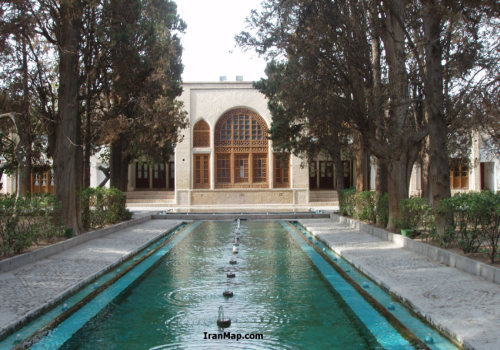
The property includes nine gardens in as many provinces. They exemplify the diversity of Persian garden designs that evolved and adapted to different climate conditions while retaining principles that have their roots in the times of Cyrus the Great, 6th century BC. Always divided into four sectors, with water playing an important role for both irrigation and ornamentation, the Persian garden was conceived to symbolize Eden and the four Zoroastrian elements of Air, earth, water and fire. These gardens, dating back to different periods since the 6th century BC, also feature buildings, pavilions and walls, as well as sophisticated irrigation systems. They have influenced the art of garden design as far as India and Spain.

9 Persian Gardens (Bagh e Irani) that Recognized by UNESCO in 2011 are included :
Ancient Pardis Garden of Pasargadae
Bagh-e Eram : Shiraz
Bagh-e Chehel Sotun : Esfahan
Bagh-e Fin : Kashan
Bagh-e Abas Abad : Behshahr
Bagh-e Shahzadeh : Kerman
Bagh-e Dolat Abad : Yazd
Bagh-e Pahlavanpur : Mehriz
Bagh-e Akbariyeh : Birjand

باغ ایرانی بعنوان سیزدهمین اثر فرهنگی و تاریخی ایران ثبت جهانی شد …باغ ایرانی نامی فراتر از یک باغ و یا یک بوستان و یا پارک معمولی است ، باغ ایرانی چکیده اندیشه و فرهنگ کهن سرزمین ایران و نگاه خاص ایرانیان به واژه بهشت و پردیس است در باغ ایرانی میتوان عرفان و هنر ایرانی را در هم دید…سیزدهمین اثر ایران شامل مجموعه ای از 9 باغ ایرانی است که در استانهای مختلف ایران قرار دارند اگرچه باغ ایرانی را میتوان در کشورهای دیگر از هند تا اسپانیا نیز مشاهده کرد……باغ ایرانی را میتواند در جای جای ایران مشاهده کرد ، اساس باغ ایرانی همچون معماری کهن ایرانزمین بر اساس طرح چلیپا استوار بوده که این تقسیمان معمولا با نهر آب و جوی آب انجام میشده مرکز چلیپا یا با حوض بزرگ و یا با بنایی زیبا طراحی میشده ، این چهار بخش نماد چهار عنصر مقدس آب ،باد ، خاک ، آتش بوده ….معمولا دور هر چهار قسمت با سرو تزئین میشده که سرو نیز نماد طول عمر و زندگی میباشد و درون محوطه درختان میوه کاشته میشده ، اطراف نهرها نیز با گلهای مختلف به مانند گل سرخ ، یاس ،اطلسی و غیره تزئین میشده و در بسیاری از مناطق درون آن حوض بزرگ گل نیلوفر آبی کاشته میشده که آن نیز در فرهنگ مردمان ایرانزمین پر اهمیت بوده

باغهای ایرانی که مورد تائید پونسکو قرار گرفتند 9 عدد میباشند که اولین آن با باغ باستانی پردیس پاسارگاد با عمری بیش از 2600 سال شروع میشود
دومین باغ ، باغ ارم شیراز است
سومین باغ ، باغ کاخ چهل ستون اصفهان
چهارمین ، باغ فین کاشان
پنجمین ، باغ عباس آباد بهشهر
ششم ، باغ شاهزاده ماهان – شازده
هفتم باغ دولت آباد یزد
هشتم باغ پهلوانپورمهریز
نهم باغ اکبریه بیرجند

باغ ایرانی از شاخصه های معرفی سرزمین ایران به دنیا میباشد و برای ثبت جهانی این اثر مهم به همگی ایرانیان و ایراندوستان تبریک

Source Bijan1351

No responses yet

Jun 28 2011

How to Stop GPS From Revealing Your Location

GPS system data can be recorded when someone takes a picture of you, and you might not even be aware of it. Location information (GPS system coordinates) stored inside photos can reveal your home address, work address, and places you or your children frequent. Geotags can make it very easy for people to determine exactly where you are and when.

The good news is that there are easy ways to protect your privacy and prevent GPS location data from being revealed in your photos. Yes, there are several ways to do this. Here are a handful of easy ways that aren’t too complicated and don’t take require you to have expensive software.

How to Remove GPS Location Data From Your Photos:
If you’re not sure if your photo has location metadata, there are two easy ways to check. First, try right-clicking on your image file. Then choose Properties, then Details. Scroll down to GPS and check for coordinates.
Or, go to stolencamerafinder.com and drag your photo onto the box. Don’t worry if it says “fail” – you can still click the link to view the exif data. Scroll down and look for the GPS data.

If there is GPS data recorded in your photos, follow these steps to remove it:
1. Open your photo in any program. Display it on the screen so that it looks exactly how you would like.

2. Press the PRINT SCREEN button on your keyboard, which is often in the upper right-hand corner. The print screen button may simply say “prt sc” or something similar. After you hit the button, nothing appears to have happened, but chances are it worked. Continue on to Step 3.

3. Next, open up Windows Paint or Microsoft PowerPoint and then paste by pressing CTRL-V. Your screenshot should appear.

Make sure you paste a screen shot of the image and do NOT simply open the photo in Windows Paint and then resave it, or your GPS location data may be preserved.

4. Use the Save As feature, then choose “other formats” such as .JPG.

How to Prevent GPS Location Data From Being Recorded in Your Photos:
iPhone – Go to Settings, General, Location Services. Here you can set which applications can access your GPS coordinates, or disable the feature entirely. If you use your GPS tracking your children’s whereabouts or to find local restaurants and services on the go – then don’t disable the features entirely.

BlackBerry – Click the camera icon, press the Menu button and choose “Options”. Set the “Geotagging” setting to “Disabled”. Save the updated settings.

Android – Open the Camera application, select “Store Location” and set it to “Off”.

Facebook – removes geotags from uploaded photos, however other social networking sites do not. Look into your privacy settings and turn off location sharing.

No responses yet

Jun 27 2011

GPS map newsletter – June Edition

June Edition of GPS map newsletter recently published by MemNav team with news and market trend in the Middle East and Iran. This month edition covers;
- Why Buy A GPS Navigation,
- Two key factors in Navigation,
- Why a Dedicated GPS System is Safer,
- Recent Editions

It also covers Regional GPS Map News including: Iran Digital Map for GPS, PND and Mobiles, Iran GPS Map’s online shop with new features, Armenia GPS map for Garmin, GPS Glossary of Terms and Compatible Mobiles with Iran GPS Map More information

No responses yet

Next »